Box Island is a mobile game that takes boys and girls on an exciting adventure, while teaching the fundamentals of coding. Kids apply the basics, such as loops and conditionals, to progress through the super fun and challenging gameplay. Rendered in a beautiful 3D game world featuring 100 levels, where the first 10 levels are free, Box Island is a story-driven journey that keeps kids highly engaged and motivated while playing.
◆ The Hour of Code is back!
Take a trip onto a new mysterious island and help Hiro explore it! In this fun mobile tutorial, students take part in a journey that has been specifically designed for the Hour of Code™ campaign. The tutorial is free, student-led and suitable for age six and up (6+).
◆ Awards and Featuring
- Winner of Gold Award at Parents' Choice Awards 2016
- Winner of Best Fun for Everyone at Nordic Game Awards 2016
- Winner of Bronze Award at International Serious Play Awards 2016
- Featured by Code.org for the Hour of Code 2015 as official mobile partner
- Featured in Techcrunch, Mashable, Adweek and Guardian
- Featured in the App Store in over 75 countries!
◆ Coding fundamentals that kids are introduced to
- algorithmic thinking
- pattern recognition
- sequencing
- loops
- conditionals
- debugging
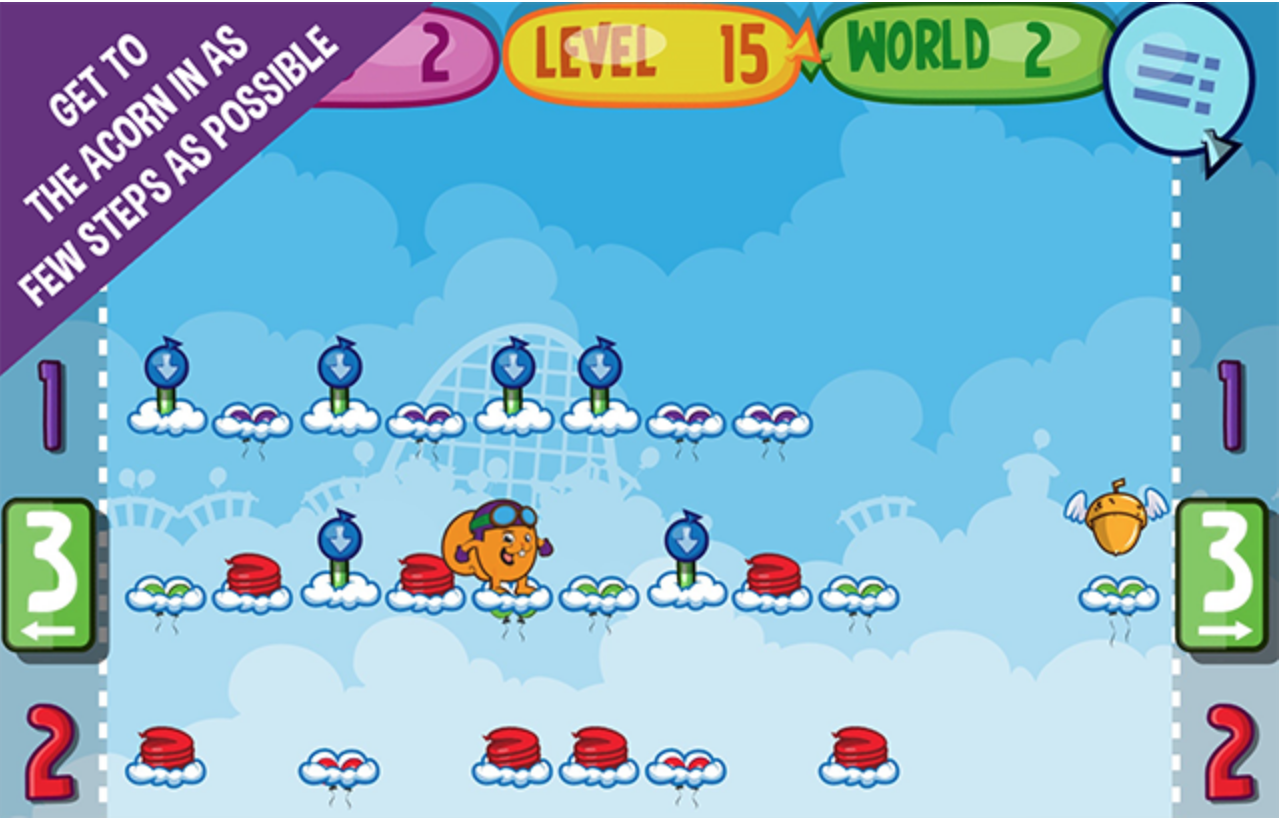
Jake! A platform and logic game in one.
Can you help Jake the
squirrel find his acorn? Make him jump from cloud to cloud until he
reaches the acorn. Think carefully which way he should go, as only the
shortest path leads to the golden acorn!
Increasingly difficult levels make it harder and harder to get to the acorn, with lots of detours that must be overcome.
A
tutorial explaining the principle of the game makes it easy to start.
Strategic and logical thinking is encouraged as each move has to be
planned.
FEATURES:
- Platform game and logic game in one
- 75 exciting levels
- Encourages logical thinking
- Tutorial included for a quick game start
- Beautifully drawn cloud landscape
Our commitment: no ads, no in-app purchases!
Do you have a problem, question or suggestion? Please contact us directly at support@ravensburger-digital.com.
Also check out other apps from Ravensburger such as ‘memory®’, ‘Whoowasit’, ‘The aMAZEing Labyrinth’ and many more.
 Tynker is the easiest way for kids to learn programming. Play fun puzzles to learn the basics and then create your own amazing games using over 100 step-by-step coding tutorials.
PLAY FUN GAMES TO LEARN TO CODE- Candy Quest - Sequence programming commands to lead your character home.- Monster High - Help the ghouls go on a scavenger hunt using code- Crash Course - Program drones, lights, and Sphero in a virtual environment- Dragon Journey - Use functions and subroutines to train your dragon- Lost in Space - Apply logic to lead astronaut Gus to his moon base- Lazer Racer - Create math patterns using Turtle graphics commands

 100+ STEP-BY-STEP TUTORIALSLearn with interactive tutorials and get inspired to create an unlimited portfolio of games and projects to share and play with friends.- Animation: Stop-motion animation and custom character animation- Drawing: Pen commands, math art, kaleidoscopes, and your own art studio- Game Elements: Scoring, health, buttons, and joysticks- Game Kits: Arcade shooters, platformers, runners, and physics games- Motion: Move, follow, spin, and glide objects on the screen- Music: Music, sound effects, musical notes, drum beats, and tempo- Physics: Falling balls, bouncing penguins, zero gravity, and cannons- Storytelling: Slideshows, stories, comics, jokes, riddles, and quizzesREMIX, PUBLISH, AND PLAYPublish your creations to share with the community. Explore projects made by others like you and see what they build. Like, remix and share their programs or build your own using our full-featured programming language. VISUAL PROGRAMMING - SIMPLE YET POWERFULCreate and share awesome games and apps quickly using the same visual programming language introduced in the puzzles. Program native behaviors, experiment with physics, program connected toys and design your own animated characters. You can also code offline without Internet connectivity.
Tags: coding
Learn the basics of computer programming with Daisy the Dinosaur! This
free, fun app has an easy drag and drop interface that kids of all ages
can use to animate Daisy to dance across the screen. Kids will
intuitively grasp the basics of objects, sequencing, loops and events by
solving this app's challenges. After playing Daisy, kids can choose to
download a kit to program their own computer game.

Kodable – Programming Curriculum for Elementary
This companion app to
the award-winning Kodable Curriculum is designed to teach computer
science to elementary students grades K-5 (Ages 4-11).
KODABLE CURRICULUM (Common Core Aligned)
Kodable
is the only complete K-5 curriculum taking students from learning to
think like a programmer in Kindergarten to writing REAL JavaScript by
5th grade. No computer science knowledge required of teachers! It
includes -
- Over 40 scripted, Grab & Go lesson plans
- Complete Scope and Sequence for every concept
- Over 200 on-screen activities for students
- Roster Upload + Google Classroom Integration
- Homeschool and Parent curriculum available!
Kids
learn the fundamentals of every modern programming language in a fun
and inviting way. Concepts learned through the Kodable Curriculum
include
- Sequence/ Order of operations
- Algorithmic operations
- Conditional logic statements
- Syntax
- Variables including Strings, Integers, and Arrays
- Object Oriented Programming
- Classes and Subclasses
- Properties
- Methods


Get kids hooked on coding within minutes!
Lightbot is a programming puzzle game- a game whose game mechanics require using programming logic to solve levels.
Simply
guiding a robot to light up tiles and solve levels using commands,
Lightbot cultivates a real understanding of procedures, loops, and
conditionals.
Educators around the world are choosing to use
Lightbot first when introducing their students to programming, coding
and Computer Science.
Lightbot features 50 levels and 20 challenge stars to collect and is a must-have for puzzle enthusiasts.
This
version of Lightbot can be played in English, French, Russian,
Brazilian Portuguese, Spanish, Traditional Chinese, Simplified Chinese,
Norwegian, Slovenian, Romanian, Indonesian, German, Polish, Danish,
Croatian, Dutch, Slovak, Czech, Greek, Italian, Japanese, Korean, Malay,
Thai, Hindi, Swedish, Finnish and Hungarian! Just hit the associated
flag icon on the main screen to select a language.
Lightbot
features multiple save slots and separate progress tracking for multiple
players. Multiple players can advance at their own pace in their own
save slot, and also compete on number of levels finished, number of
stars collected and number of overall commands used to complete the
game.

Our creative space Foo Studio allows kids to put programming concepts to
work by making video games and programming interactive stories.
Creations can then be shared with a global community of Foo coders.
To be successful, kids must:
* determine the actions needed to solve each Foo’s problem
* order actions in a logical sequence
* recognize patterns
* use those patterns to make their code more efficient
* test solutions
* learn from tests and try revised solutions
The
Foos is an introduction for those who have no experience programming
and is all-ages friendly! That means anyone from 5 to 105 can play, have
fun and learn real programming logic.